Best 5 USB Microphones in the US (2026)
As an Amazon Associate I earn from qualifying purchases.
What this means
When you buy through an Amazon link on this page, Amazon may pay a commission on a qualifying purchase. The price you pay is the same.
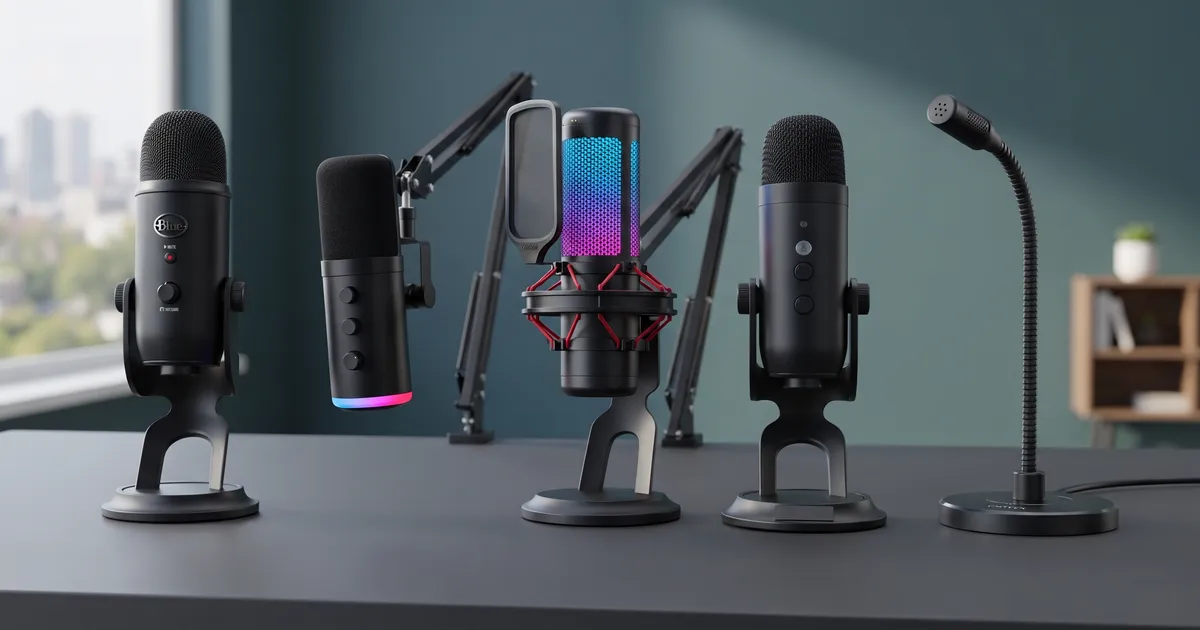
Relying on built-in laptop microphones or basic headset mics routinely leads to hollow, muffled vocal tracks and distracting ambient noise. Moving to a dedicated desktop USB microphone provides immediate clarity, but picking the right model involves navigating distinct hardware designs, sensitivity differences, and mounting setups.
Choosing can be frustrating because many models present similar technical claims while behaving very differently on a physical desk. Highly sensitive condenser capsules capture crisp room detail but also register nearby background sounds like typing or household movement. Meanwhile, dynamic options reject ambient room noise more effectively but require speaking directly into the capsule, and boom arm or stand configurations determine how much vibration reaches the recording.
So we read what the buyers quoted here report and set these 5 side by side. Every quote comes from a real review we keep on file. Our top pick comes first; if it is not your fit, the others are there for different needs.
How this list was built
By the numbers
- Ratings
- 76K
- Products compared
- 46
- Buyer quotes
- 100
- Picks
- 5
How the shortlist was drawn
- Sales and review volume
- Direct USB connectivity
- Hardware controls
What each pick was judged on
- Vocal reproduction and clarity
- Physical handling and mounting stability
- Noise handling and sensitivity
Read the full method
The editor chose the products from their listings based on popularity and availability. What is said about each microphone comes directly from owners' reviews, quoted as written, paired with manufacturer specifications and typical category characteristics.
How the shortlist was drawn
- Sales and review volumeChosen by how much buyers bought, reviewed and rated it, one per brand. Every pick was listed new and in stock on Amazon US, with a price, when this guide was built.
- Direct USB connectivityRequires straightforward plug-and-play operation over USB without demanding external power supplies or separate audio interfaces.
- Hardware controlsFeatures accessible onboard adjustments such as volume knobs, gain dials, or instant mute controls directly on the unit.
What each pick was judged on
- Vocal reproduction and clarityHow clearly and naturally the microphone captures voice recordings across various software and recording environments.
- Physical handling and mounting stabilityThe balance, stand stability, arm flexibility, and susceptibility to desk vibrations or mechanical cable stress.
- Noise handling and sensitivityHow the microphone capsule handles distant room sounds, background noise, and mechanical bumps during active use.
- Prices are not listed. They move constantly and a stale number helps nobody — the retailer shows what it costs right now.
- No brand or retailer pays TrueValuePick for a place on this list: no ads, no paid placement. How a guide is put together
Our top 5 picks



Pick 1 of 5
Best overall
- Most recommended
- Built to last

Logitech G USB Microphone
A heavy-duty multi-pattern condenser microphone with built-in voice effects and versatile polar pattern switching for desktop recording.
Price and availability are shown on Amazon.
Best for
- Multi-pattern recording: switches easily between cardioid, omnidirectional, bidirectional, and stereo modes
- Podcasters and streamers: includes onboard gain, volume, and lit mute controls
Our verdict
This microphone is built around a tri-capsule array that allows quick hardware switching between four distinct pickup patterns. A physical selector dial moves between cardioid, stereo, bidirectional, and omnidirectional modes, letting owners adapt the unit for solo podcasts, two-person interviews, or ambient room recording without changing equipment.
Day-to-day operation is straightforward across desktop operating systems, with immediate plug-and-play recognition and physical dials for headphone volume, mic gain, and a lighted mute button. Owners report that the microphone capsule is exceptionally sensitive, picking up quiet voices with clarity, though it will also detect background sounds like distant room noise unless isolation filters or software gating are used.
The substantial metal build gives it solid stability on a desk, but the upright placement on the included stand can place slight mechanical stress on the bottom-mounted USB connection.
Pros & cons
Pros
- Four hardware pickup patterns: easily switches between cardioid, omni, bidirectional, and stereo modes
- Solid construction: heavy metal build stays planted firmly on the desktop stand
- Comprehensive controls: onboard dials for gain, headphone volume, and a lit mute toggle
- Flexible mounting: works on the desktop stand or detaches for standard boom arm threads
Cons
- High sensitivity: picks up ambient room sounds and distant background noise easily
- Port clearance: upright desktop positioning puts slight mechanical stress on the bottom USB port cable
What owners say
The swivel design of the mic makes it really easy to get to the USB and headphone jack. It can also be taken off the base and screwed into a boom stand because there's a screw port on the bottom.
Rita Real · Buyer
I used the Blue Yeti for several years before upgrading to a microphone that supports both USB and XLR connections. The Blue Yeti was providing great sound, but I wanted the flexibility to expand my recording setup in the future.
"arichmondbd · Buyer
Durability-wise, this mic still feels like a tank. You can toss it in a bag, haul it to events, or set it up in your living room studio, and it’ll just keep doing its job.My one gripe is the mini-USB port.
Kell Richardson · Buyer
The sound quality is great. I have used it for podcasts and for voice recordings for a class I am writing. The sound is perfect.
Mrs. O · Buyer
It’s my first time using a dedicated mic, and the sound quality is so much better than using regular earbuds or my phone’s built-in mic.
Daisy · Buyer
Our conclusion
Get it if you want high vocal clarity with four switchable pickup patterns and dedicated gain control in a durable desktop chassis. If you need a dynamic capsule designed to ignore room noise or want an included boom arm, #2 is a better fit.
Pick 2 of 5
Best for dual USB and XLR setups
- Owner favorite
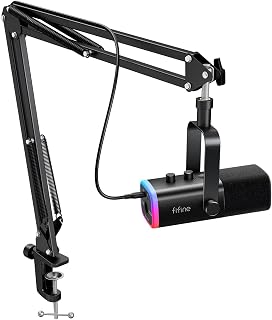
FIFINE USB Microphone
A dynamic cardioid gaming microphone bundle with an articulating boom arm and both USB and XLR output options.
Price and availability are shown on Amazon.
Best for
- Upgradable audio setups: supports simple USB connectivity now and XLR interfaces later
- Noisy environments: dynamic cardioid pattern naturally suppresses background barking and room noise
Skip it if
- You need multiple pickup patterns for multi-person conferences: #1 offers omnidirectional and bidirectional modes
- You have a very deep desk setup: the included boom arm reach may feel short
Our verdict
This dynamic microphone stands apart by offering dual USB and XLR connections in a single unit. It operates plug-and-play over USB with capacitive touch controls and customizable RGB lighting, while also allowing connection to sound cards or mixers over XLR for future setup expansion.
Owners report that the cardioid dynamic capsule does an effective job of focusing on the user's voice while rejecting ambient room sounds like televisions and barking dogs. The bundle includes an adjustable metal boom arm and desk clamp that position the mic directly in front of the mouth without cluttering desk space.
The main drawback is mechanical vibration transfer: tapping or knocking the desk can resonate through the arm clamp into the audio track, and the physical buttons and RGB lighting require USB power to operate even when connected via XLR.
Pros & cons
Pros
- Dual connectivity: supports both direct USB computer hookups and standard XLR mixer inputs
- Effective noise rejection: dynamic cardioid capsule isolates speech from ambient room sounds
- Complete mounting kit: includes a flexible metal boom arm and C-clamp for desk mounting
- Zero-latency headphone jack: built-in monitoring port delivers clear sound passthrough
Cons
- Vibration transfer: desk bumps and mount adjustments can cause audible thumping noises
- USB power required for lighting: onboard buttons, dials, and RGB require USB connection to function
- Arm reach: boom arm length may be limiting on deeper desk layouts
What owners say
This mic even picks up my voice without getting any background noise (like my dog barking, or my roommate turning on the television unexpectedly), which is SO important when you are trying to submit a high-quality recording to someone.
Adrian E · Buyer
I will say the if you touch the mount at all the mic catches it and makes a thumping/boom noise. It isn't that bad but even readjusting the mic it will catch all the movements and stuff.
Jon Sayad · Buyer
The mic, on the other hand, only raises expectations further during setup, with the well-diffused back RGB showing off immediately upon being plugged in, and the capacitive buttons feeling very consistent and responsive.
Buyer
Made with solid materials and I believe it to be quite durable, but not wanting to test that theory as we know how electronics can be.
Shawn R Jean · Buyer
Our conclusion
Choose this model if you want background-noise rejection, an included boom arm, and the flexibility to switch between USB and XLR connections. If you prefer a compact gooseneck mic for basic calls, look at #5.
Pick 3 of 5
Best boom arm kit
- Easiest to live with
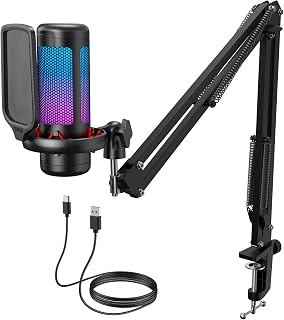
TONOR USB Microphone TC310+
A plug-and-play condenser mic kit featuring an adjustable metal boom arm, tap-to-mute top sensor, and integrated pop filter.
Price and availability are shown on Amazon.
Best for
- Desk mounting: includes an adjustable boom arm and tight-corner vice clamp
- Gaming and live chat: features a silent tap-to-mute sensor and rotary gain control
Skip it if
- Your computer sits far from the mic clamp: the included cable is relatively short
- You need XLR mixer connectivity: this model is USB-only; #2 includes XLR
Our verdict
This all-in-one package combines a condenser capsule with an articulating metal boom arm, pop filter, and multi-mode RGB lighting. The clamp mechanism is designed with a compact handle that twists easily into tight desk corners, holding the microphone securely at your preferred height.
Day-to-day handling centers on physical ease of use. A tap-to-mute sensor on the top of the body allows silent audio cutoffs without mechanical clicking, while a rotating dial provides quick volume adjustment. Owners note that voice reproduction is crisp and bright straight out of the box with zero software configuration needed.
The microphone has high sensitivity, picking up voice details easily from several feet away, but the supplied connection cable is somewhat short for setups where the PC tower sits on the floor or far across the desk.
Pros & cons
Pros
- Sturdy boom arm: holds position securely without sagging or drifting during use
- Silent tap-to-mute: top-mounted touch sensor avoids noisy physical button clicks
- Quick setup: connects and operates immediately without driver or software configuration
- Integrated pop filter: helps smooth vocal plosives in a compact form factor
Cons
- Short cable: included USB wire may require an extension if the PC is not adjacent
- Sensitive capsule: captures background room sounds and quiet speech from distant rooms
- Slight RGB touch delay: light mode switching has a mild response latency
What owners say
Right out of the box you have to connect 2 parts to complete the microphone, and then attach it to your desk or whatever. Plug it in, and BAM... it just works. No drivers, no BS, it just works.
Christina · Buyer
Tap to mute works great, audio dial on the top is easy to use, rgb color touch button is mildly delayed, but this thing can pick me up me up talking quietly from like 2 rooms away.
Elizabeth Sternglass · Buyer
The included boom arm is another huge plus. It feels sturdy, holds the microphone securely in place, and allows for easy positioning. Once adjusted, it stays exactly where you put it without sagging or drifting.
DJ Brandon Bell · Buyer
Setup was genuinely effortless. The boom arm goes together without any head-scratching, the mic clicks into place, and you're basically ready to go. No driver installations, no digging through menus, no watching a 20-minute YouTube tutorial just to get sound coming out. Plug it in, and it works.
Jonathan Guntert · Buyer
Our conclusion
Buy this kit if you want a complete boom arm setup with silent tap-to-mute controls and a pop filter ready out of the box. If you need portable phone or tablet connectivity adapters, #4 is better equipped.
Pick 4 of 5
Best for mobile and PC recording
- Great for beginners

ZealSound USB Microphone
A compact desktop condenser microphone equipped with mobile adapters, physical gain dials, and onboard echo adjustment.
Price and availability are shown on Amazon.
Best for
- Phone and tablet creators: comes with USB-C and Lightning adapters for mobile recording
- On-the-go podcasting: compact metal build fits easily into bags for travel
Skip it if
- You rely exclusively on a long-term mute switch: one owner noted mute reliability issues over time
- You prefer a boom arm mount included in the box: #3 includes an arm kit
Our verdict
This top-addressed condenser microphone is designed for versatility across both computer and mobile devices. It includes dedicated adapters for modern USB-C and Lightning devices, drawing operating power directly from the connected device without draining battery excessively.
The microphone body features independent rotary dials for gain, headphone monitoring volume, and an adjustable echo effect, paired with a push mute button. Owners report clear vocal reproduction on voiceovers, videos, and online meetings with straightforward plug-and-play setup across Mac and Windows laptops.
The capture pattern requires keeping the microphone relatively close to the mouth for optimal volume and detail, and one owner reported that the mute function became inconsistent after several months of use.
Pros & cons
Pros
- Cross-device adapters: includes USB-C and Lightning connectors for smartphones and tablets
- Direct physical dials: dedicated controls for gain, headphone monitoring level, and echo
- Compact footprint: solid metal desktop base packs easily into handbags and backpacks
- Zero setup: plug-and-play operation across desktop and mobile platforms
Cons
- Close positioning needed: requires keeping the top of the capsule near your mouth for full volume
- Mute switch durability: an owner noted the mute button became unreliable after months of use
- Input level variance: an owner noted occasional input volume inconsistency
What owners say
I do wish that I don’t need the microphone so close to my face, but I am making ASMR and whispering, so it makes sense as to why I need the microphone so close to my face.
Nora Haines · Buyer
i bought this mic a few years ago and it works like a charm. It is very durable and it comes with two different types of connectors for iphone and android users.
Tiffany Williams · Buyer
Although I experienced an issue with the input level on my particular unit, I still like the overall design and functionality of the K66 and wanted to continue using this model.
Ronald Santos · Buyer
I didn’t change any of the settings which were all turned up to the max level including the echo effect. I loved it so much that I haven’t changed any of the settings and I record all my new videos as is. I swear it sounds like I’m in a recording studio with amazing acoustics!
Christopher P Hoffman · Buyer
Our conclusion
Select this microphone if you need a portable desktop mic that connects directly to smartphones, tablets, and laptops with included adapters. If you only need a fixed gooseneck for dictation and work calls, #5 offers a smaller footprint.
Pick 5 of 5
Best gooseneck for dictation
- Least upkeep

CMTECK USB Microphone
A flexible gooseneck desktop microphone with a small weighted base, long cable, and straightforward LED mute button.
Price and availability are shown on Amazon.
Best for
- Dictation and speech-to-text: registers spoken words clearly with high accuracy
- Small workspaces: compact base fits easily on crowded desks and pushes out of the way
Skip it if
- You want broadcast studio audio for music or vocal tracking: #1 provides multi-capsule studio sound
- You need physical gain adjustment dials on the body: it relies on computer input settings
Our verdict
This compact gooseneck microphone is built specifically for voice calls, language learning, and voice-to-text dictation. Its flexible metal neck rotates 360 degrees, allowing precise angle adjustments while keeping the stable base planted on a crowded desk surface.
Owners report that the microphone delivers clear speech clarity on platforms like Zoom, Google Meet, and Slack, picking up quiet speech even when positioned a couple of feet away. The weighted base includes a large mute button with an LED indicator light that clearly shows connection and mute status.
While convenient for calls and transcription, it lacks onboard gain controls, and one owner reported that pressing keyboard modifier keys during dictation occasionally caused the microphone input to cut off.
Pros & cons
Pros
- Flexible 360-degree neck: bends easily to point the capsule exactly where needed
- Clear LED mute toggle: large base button with green and red visual status lights
- Minimal desk footprint: small weighted base stores easily when not in use
- Generous cord length: long cable with included wrap helps routing around desks
Cons
- Basic feature set: lacks onboard gain or volume dials on the unit
- Keyboard interaction quirk: an owner noted input cutoffs when pressing the shift key during dictation
- Plain aesthetics: utilitarian design focused strictly on functional voice chat
What owners say
This mic is very plain, but it really works well and has a small footprint on my desk. Easy to place out of the way if I'm not using it.
Gurtar Man · Buyer
This is a great size since it's not bulky and it fits nicely on my work desk, which is what I wanted, the sound is great I use it for google meetings and phone calls thru the pc and no complaints so far and it's super easy to mute and see the LED light
Maria · Buyer
I use this with my Acer PC laptop. No installation of software or anything- it just works. Perfect for my Slack and Zoom calls.
Moth · Buyer
When I press Shift to go to the next line, the mic cuts off, and I have to reset it to start again.
GuitarDude · Buyer
Our conclusion
Get this model if you need a low-profile gooseneck mic for dictation, office meetings, and language practice without bulky hardware. If you need rich vocal presence and studio recording controls, #1 remains the stronger option.

Buying guide
Understanding Capsule Types
Condenser microphones are exceptionally sensitive and capture high-frequency detail and voice warmth effortlessly. However, because they register subtle environmental sounds, they perform best in quieter rooms or with noise isolation filters applied. Dynamic microphones have lower sensitivity and a tighter pickup zone, making them suitable for untreated rooms or gaming spaces where background keyboard clicks and household noise are common.
Stand and Boom Arm Positioning
A desktop stand keeps the footprint compact, but placing a microphone flat on a work surface can transmit thumps and typing vibrations directly into your audio stream. A clamped boom arm elevates the capsule closer to your mouth, which improves vocal presence and frees up workspace. When using an arm, ensure the desk clamp fits your surface thickness.
Controls and Monitoring
Physical mute buttons with clear LED status lights prevent accidental open-mic moments during live calls or broadcasts. Onboard gain knobs allow quick sensitivity tweaks without opening operating system settings, while zero-latency 3.5 mm headphone monitoring jacks let you hear voice levels without digital delay.
Mistakes buyers keep making
Drawn from what buyers complain about in their reviews.
Placing sensitive condensers on vibrating desks
High-sensitivity microphones pick up mechanical vibrations from typing, mouse clicks, and desk bumps unless decoupled or mounted on an arm.
Overlooking USB port strain
Heavy microphones seated in fixed upright desktop stands can put physical pressure on right-angle or bottom-facing USB cables.
Ignoring pickup direction
Speaking into the top of a side-address microphone or off-axis on a cardioid capsule leads to muffled, quiet audio capture.
Default audio output switching
Connecting a USB microphone with a built-in headphone jack can automatically redirect your operating system's sound output away from your standard speakers or headset.
Frequently asked questions
How were these USB microphones selected?
The editor chose the products from their listings based on sales volume and ratings on Amazon US, selecting one model per brand from new, in-stock inventory.
Do USB microphones need special driver software to work?
Most USB microphones operate as standard class-compliant plug-and-play devices on Windows and Mac computers without requiring manual driver installations.
Why does my microphone pick up background room noise?
Condenser capsules have high sensitivity and pick up distant sounds unless gain is lowered, background suppression software is engaged, or the mic is positioned closer to your mouth.
What is the benefit of having an XLR port alongside USB?
A dual-connectivity microphone lets you start with a direct USB cable to a computer and later transition to dedicated audio mixers or sound cards using standard XLR cables.

Nick Serrano
Editor, Computers & Office guides
Nick Serrano covers computer and office gear for TrueValuePick, building each guide from what owners report in public about the keyboards, monitors and desk gear they work with.
Compiled this guide from buyer reviews, each one checked against an archived copy of the listing it came from.