Best 5 Monitor Arms in the US (2026)
As an Amazon Associate I earn from qualifying purchases.
What this means
When you buy through an Amazon link on this page, Amazon may pay a commission on a qualifying purchase. The price you pay is the same.
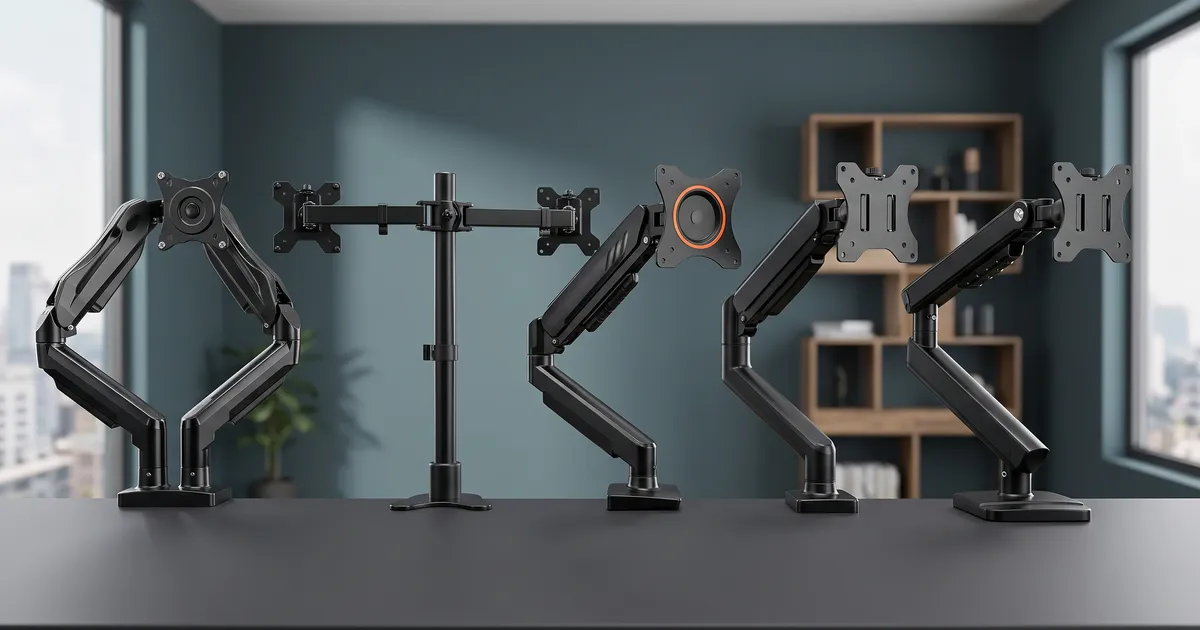
Stock monitor stands consume significant desk space and lock displays into rigid heights and angles. When working or gaming across long sessions, an improperly positioned screen often leads to neck strain, hunched posture, and a crowded workspace.
Finding the right aftermarket arm can be tricky. Many mounting arms share similar specifications on paper, yet differ drastically in joint stiffness, ease of tension balancing, clamp security, and how far their elbows push out behind a desk placed against a wall.
So we read what the buyers quoted here report and set these 5 side by side. Every quote comes from a real review we keep on file. Our top pick comes first; if it is not your fit, the others are there for different needs.
How this list was built
By the numbers
- Ratings
- 123K
- Products compared
- 30
- Buyer quotes
- 72
- Picks
- 5
How the shortlist was drawn
- Popularity and Availability
- Standard VESA Compatibility
- Solid Desk Attachment
What each pick was judged on
- Mounting Stability
- Articulation and Adjustment
- Cable Management and Clearance
Read the full method
The editor chose these products based on their listings, and all findings reflect what owners reported in their reviews. The surrounding details combine those owner experiences, documented specifications, and typical performance standards for desk monitor arms.
How the shortlist was drawn
- Popularity and AvailabilityChosen by how much buyers bought, reviewed, and rated each model, picking one per brand. Every pick was listed new and in stock on Amazon US when this guide was built.
- Standard VESA CompatibilityEach arm had to support standard 75x75mm and 100x100mm mounting patterns used on modern computer screens.
- Solid Desk AttachmentListing verified hardware for standard C-clamp and grommet mounting through desk surfaces.
What each pick was judged on
- Mounting StabilityHow firmly the base clamps to desktops and whether the joints hold screen weight without sagging over time.
- Articulation and AdjustmentThe ease of tilting, swiveling, rotating, and raising displays to match eye level.
- Cable Management and ClearanceHow well integrated channels fit power and display cords, and whether arm joints interfere with nearby walls.
- Prices are not listed. They move constantly and a stale number helps nobody — the retailer shows what it costs right now.
- No brand or retailer pays TrueValuePick for a place on this list: no ads, no paid placement. How a guide is put together
Our top 5 picks


Pick 1 of 5
Best overall
- Most recommended
- Built to last

HUANUO Monitor Arm HNDS6
Dual independently articulated arms hold two screens up to 32 inches securely using a reinforced dual-clamp desk base.
Price and availability are shown on Amazon.
Best for
- Dual-screen setups: each arm articulates and adjusts height independently
- Mixed orientation: easily holds one screen in portrait and one in landscape
Skip it if
- You only use a single display; #3 offers a simpler single-arm footprint
Our verdict
The HUANUO HNDS6 provides independent positioning for two displays up to 32 inches each. Its large dual C-clamp desk base provides a firm anchor that resists wobbling during typing or adjustments. Owners report that both arms move smoothly through tilt, swivel, and full portrait-to-landscape rotation.
Dialing in the counterbalance requires turning the tension bolts, which some owners note can be stiff out of the box. Additionally, the integrated cable management channels fit standard pairs of power and display cords comfortably, but become snug if extra thick cords are routed together.
Pros & cons
Pros
- Independent arm motion: height, tilt, and swivel adjust separately for each monitor
- Stable base: dual C-clamp setup prevents desk wobble
- Clear instructions: straightforward assembly with included hardware
Cons
- Stiff tension bolts: initial tension tuning requires substantial hand strength
- Tight cable channels: routing more than two thick cords per arm is difficult
What owners say
The guide on the upper arm uses only one screw and clips in on one side. It honestly feels a little flimsy but ultimately holds both the thick three prong PC power cable and the DisplayPort cable without bulging or warping.
Aaron T. · Buyer
The biggest win for me is the range of motion—you can adjust height, tilt, swivel, and even rotate the screens, which makes it easy to find a comfortable setup whether you’re working or gaming.
AK · Buyer
I appreciate that it uses two clamps and a nice big base for connecting to the desk surface - this seems very sturdy and is holding the weight of two monitors just fine.
DWTW · Buyer
The wire management is also pretty good and is easy to use making look nice and clean but if you have fatter cords I would just remove the plastic piece and screw and zip tie it tot he arm instead as i did for my main monitor!
Alonzo · Buyer
Show 2 more quotesShow fewer
It holds my Acer 32" monitor without breaking a sweat (though it's a very light screen, to be fair. Lighter than alot of 27" ones i've owned)
Hunter R. · Buyer
They articulate super well and I even installed one monitor vertically. Both are very large 28” monitors but this product has no problems keeping them in position.
Crystal · Buyer
Our conclusion
Get it if you want full independent articulation for two screens on a sturdy dual-clamp base. If you only run one monitor, #3 provides a streamlined single-screen mount.
Pick 2 of 5
Best center-pole dual mount
- Built to last

VIVO Monitor Arm STAND-V002
A rigid center pole and steel articulating arms keep dual displays aligned at a shared height.
Price and availability are shown on Amazon.
Best for
- Side-by-side matching monitors: shared center pole keeps heights level across both screens
- Grommet or clamp mounting: includes hardware for clamping or through-desk installation
Skip it if
- You need independent height adjustment for two different screen sizes; #1 adjusts each arm height separately
Our verdict
The VIVO STAND-V002 utilizes a central steel pole with hinged extension arms to suspend two monitors up to 30 inches. Its compact desktop footprint frees up work space while maintaining steady positioning once joint hex nuts are tightened down.
Because both arms attach to a single collar on the center pole, adjusting height requires loosening an Allen bolt and supporting the weight of both monitors simultaneously. Owners also note that rotating joints have slight rotational play, which can shift monitor leveling if top-mounted webcams are placed off-center.
Pros & cons
Pros
- Compact packaging: ships in a small box with clear step-by-step assembly guides
- Solid steel build: holds monitors steady once joints are secured
- Through-desk option: supports grommet mounting through pre-drilled holes
Cons
- Shared height collar: adjusting vertical height moves both monitors together
- Free rotation joint: slight play at the VESA bracket can tip horizontal alignment off level
What owners say
Due to the single mount and angles of movement for the arms, you're going to have to have your desk a few inches from your wall in order to get your mounts close to the back edge of your desk.
Quen10k · Buyer
Doing so, requires bending the back arms in such a way that they're touching the wall. Since the wall is in the way, I have to angle the monitors and pull them out a bit to do this (make them touch).
BriGuy · Buyer
The adjustable arms are also great for getting the screens lined up the way I like them. The C-clamp was straightforward to install and doesn’t take up nearly as much desk space as having two separate monitor stands.
Austin K. · Buyer
Height adjustment requires using an allen wrench (supplied) to loosen the compression on the center post. This may be a bit fiddly once two monitors are mounted as you'll have to hold their weight during adjustment. The monitor heights cannot be adjusted independently.
Nicodemus · Buyer
Our conclusion
Get it if you run two similar monitors side by side and prefer a straightforward center-pole mount. If you need fully independent height adjustments for each screen, #1 is the better fit.
Pick 3 of 5
Best for single monitors
- Easiest to live with
- Great for beginners

ErGear Monitor Arm EGDMA69B
A tool-free VESA mounting plate and smooth gas spring make single-screen positioning quick and simple.
Price and availability are shown on Amazon.
Best for
- Single display setups: supports screens from 13 to 34 inches up to 19.8 lbs
- Frequent adjustments: smooth tilt and height articulation with tool-free screen mounting
Skip it if
- You need to mount two displays on one base; #1 supports dual screens
Our verdict
The ErGear EGDMA69B is tailored for single displays up to 34 inches. Its tool-free VESA attachment mechanism allows screens to snap onto the arm quickly without juggling screws behind the display during final mounting. Integrated channels effectively route cords along the upper and lower arm segments.
Owners observe that because of the arm's geometry, mounting the base directly in the center of a desk may position the display slightly offset when pushed back, requiring the base clamp to be placed slightly to one side to center the screen.
Pros & cons
Pros
- Tool-free VESA plate: simplifies attaching and detaching the monitor
- Smooth motion: broad range of height and tilt adjustment
- Effective cable routing: keeps cords concealed along the arm
Cons
- Offset base positioning: centering the screen often requires clamping off-center on the desk
- Bulky desk clamp: base mounting hardware takes up noticeable space beneath the desk lip
What owners say
Sturdy, great rotation. The only downside is if you mount the base centered on the desk, you'll never be able to center the actual monitor. You have to offset the base to perfectly center the monitor.
Ryan J · Buyer
Being able to move the screen around, change its height, and get it into a more comfortable position is much more convenient than relying on a regular monitor stand. The built-in cable management is another nice touch since it helps keep the desk looking cleaner.
Aldo B. · Buyer
My only concern, is with all the heavy duty, solid parts- the back mounting bracket attached to the monitor comes down to 1 small screw keeping the monitor from crashing onto the desk. One screw.
Buyer
It attached to my desk easily and is very stable. My favorite part is I was able to use a universal mount to attach the mini pc directly between the monitor arm and the monitor and run all the cords through the channels on the mount.
Jen Hupf · Buyer
Our conclusion
Get it if you want an easy-to-install, single-screen mount with fluid articulation. If you require dual monitor mounting, #1 is designed for two screens.
Pick 4 of 5
Best for heavy ultrawide screens
- Built to last

WALI Monitor Arm GSMP001N
High load capacity supports single monitors up to 26.4 lbs with dependable gas-spring balance.
Price and availability are shown on Amazon.
Best for
- Ultrawide monitors: rated to hold heavy 34-inch and 38-inch displays without drooping
- Deep desks: extends outward up to 19.3 inches for flexible viewing distances
Skip it if
- You want dual screens on a single mount; #1 is built for dual setups
Our verdict
The WALI GSMP001N is built for heavier displays, holding flat screens up to 26.4 lbs and curved displays up to 19.8 lbs. Owners of heavy 34-inch and 38-inch ultrawide monitors report that the arm maintains position without slipping or sagging once the tension is dialed in.
The clamp assembly includes multiple components that require bolting together before desk mounting, making initial setup slightly more involved than simpler one-piece clamps.
Pros & cons
Pros
- Heavy weight capacity: securely supports large ultrawides up to 38 inches
- Stable positioning: maintains height and tilt angles without drifting
- Generous reach: extends over 19 inches from the mount point
Cons
- Multi-part clamp setup: base requires assembling multiple plates and bolts
- Desk edge sensitive: requires a completely flat underside clear of under-desk lips
What owners say
It is pretty heavy duty and adjusts easy after the first initial set up. You have to make sure to set your tension right. Our monitor does not fall at all and stays when set at any height.
Stephanie · Buyer
The one I just got had a totally different, much more complicated clamp that involved assembling multiple parts into the desk clamp, then tightening it to the desk with two bolts and an Allen wrench.
Patrick E. · Buyer
Setup was straightforward, and the gas spring adjustment works well once dialed in. It holds my monitor securely and offers the full range of motion I expected—tilt, swivel, rotation, and height adjustments all function smoothly.
Werking reviews · Buyer
I had a difficult situation to set it up in, and it was versatile enough to allow me to get the job done. It has worked perfectly ever since. Assembly was easy and straight forward, instructions were well done, and the adjustments on it are as described.
Buyer
Our conclusion
Get it if you have a large or heavy ultrawide display that demands strong weight support. If you have a standard dual-monitor setup, choose #1 instead.
Pick 5 of 5
Best mechanical spring mount
- Great for beginners

NB ERGONOMIC Monitor Arm A5-B
A mechanical spring mechanism delivers smooth screen movement without gas cylinder pressure concerns.
Price and availability are shown on Amazon.
Our verdict
The NB ERGONOMIC A5-B utilizes a mechanical spring system rather than a gas cylinder, offering reliable movement and steady tension over time. It supports monitors up to 32 inches and provides full tilt, swivel, and height adjustments.
While well-suited for typical 24- to 27-inch screens, owners of heavier 32-inch monitors note that the tilt joint screws must be tightened firmly to prevent forward tilting.
Pros & cons
Pros
- Mechanical spring core: eliminates gas pressure leakage concerns over time
- Sleek aluminum arm: slim profile saves desktop space
- Simple installation: easy video guide accessible via QR code
Cons
- Tightening needed on 32-inch screens: tilt joint requires firm tightening for heavier displays
What owners say
Assembly is simple. Good mounting options. I would definitely recommend it for a 27" monitor. I really have to crank down the tilt screws to support my Samsung 32" monitor. It works, but could use a little beefing up.
Owen · Buyer
All of the monitor arms I have purchased have been NB. Very reliable, stable clinching, several locations to tighten or to loosen different joints. I’ll stop there lol. My newest holds a 32 in Samsung Odyssey.
Michael Diaz · Buyer
The monitor arm exceeded my expectations in every way. It’s sturdy, easy to adjust, and holds my screen perfectly without any wobble. Installation was simple and required minimal effort. The design is sleek and saves a lot of desk space, making my workspace feel more organised and professional.
Peleg Shlomo · Buyer
The build quality is solid and sturdy, and it easily supports my monitor without any sagging. Installation was straightforward, and all the necessary hardware was included.
Mel Dalton · Buyer
Our conclusion
Get it if you prefer a mechanical spring single-monitor arm with smooth height travel. If you have a heavier ultrawide display, #4 provides higher load headroom.

Buying guide
Single vs. Dual Mount Architecture
Dual monitor mounts like #1 and #2 save desktop space by anchoring two screens to a single desk base. If you need independent height adjustment for two displays of differing sizes or vertical orientations, independent gas-spring arms like #1 provide individual articulation. A fixed center pole design like #2 locks both arms to a shared height collar, making it simpler to keep identical screens aligned.
Desk Clearance and Wall Proximity
Articulating arms require rear clearance when monitors are pushed back. If your desk sits flush against a wall, bending arm joints backward can push against drywall or force screens forward toward your face. In tight spaces, positioning the clamp off-center helps tuck the elbows along the desk edge rather than directly backward.
Tension and Screen Weight
Mechanical and gas-spring arms must be counterbalanced to match the exact weight of each screen. If a display drifts upward or sags downward, adjusting the joint tension bolts with the included hex key restores balanced movement.
Mistakes buyers keep making
Drawn from what buyers complain about in their reviews.
Using oversized VESA screws without spacers
Stock screws that are too long can bottom out in shallow monitor threads, leaving the mounting plate loose and the screen wobbly.
Placing clamps over desk crossbeams
Clamping over an under-desk support beam or lip prevents the mounting bracket from seating flat, compromising stability.
Ignoring wall clearance
Dual articulating arms pushed straight back can collide with walls behind shallow desks.
Forcing thick cables through narrow channels
Cramming multiple braided or heavy power cables into integrated plastic guides can pop clips open or pinch wires.
Frequently asked questions
How were these monitor arms selected?
The editor selected these products based on listing availability and owner reviews on Amazon US, choosing top-performing models from distinct brands.
Can these arms hold curved monitors?
Yes, provided the monitor uses standard 75x75mm or 100x100mm VESA patterns and stays within the rated weight limit. Some curved displays require the included spacers and longer screws to clear recessed housings.
What desk surfaces are suitable for clamping?
Solid wood and dense manufactured desktops work well. Glass desktops or hollow-core desks with thin veneer tops should not be clamped directly without reinforcement plates.

Nick Serrano
Editor, Computers & Office guides
Nick Serrano covers computer and office gear for TrueValuePick, building each guide from what owners report in public about the keyboards, monitors and desk gear they work with.
Compiled this guide from buyer reviews, each one checked against an archived copy of the listing it came from.